Donnerstag, 26. September 2024

GaiaPyCreator: Display tilesets and tilemaps

 GaiaPyCreator is making good progress, Recently I added functionality to display tilesets and tilemaps.

Here you can see tileset display (MacOS):

And here you can see tile map display (Windows):


In general, the conversion from .net based GaiaTheCreator to python is going very well and quicker than expected :)

The next are which is converted will be the maps.

Montag, 27. Mai 2024

GaiaPyCreator: Current progress

The migration of the existing GaiaTheCreator application to a python GUI application is working well.

These features are currently implemented:

- Load project, store ROM data in porject file. Therefore there is only oen project file which contains the whole data

- Display item data: Name, Description, Find Message and "Is Removable" flag. This data is directly loaded from the ROM so the whole text conversion routines are already working.


In general, it's quite easy to convert the existing logic from the existing GaiaTheCreator application to Python so I'm optimistic to make good progress in the next weeks.


Montag, 2. Oktober 2023

GaiaPyCreator

After a long time there is a sign of life from me...

I apologize for the long time without an update or information. I haven't worked on the editor in almost two years. On the one hand for time reasons and on the other hand for technical reasons. The editor has grown since 2014, back then I was still a complete programming beginner, which is unfortunately also reflected in the code and architecture.

The editor was written using Windows Forms and C# and, in my opinion, is very far from state of the art.

Therefore, I decided to recreate the editor with Python.

The editor will then be a cross-platform application, i.e. able to run on Windows, MAC and Linux.

I can take over the basic functionality but the entire architecture is now set up cleanly so that the code is more maintainable.

I set up the editor as an open source project:

https://github.com/KevConrad/GaiaPyCreator


This gives you the opportunity to track progress, test interim versions and also collaborate.


I will definitely keep you updated on the progress here.

I think the porting will take at least half a year.

Mittwoch, 29. Dezember 2021

Event Editor - Edit Events

After a long time I'm finally letting you hear from me again :) Unfortunately, I haven't found the time to continue working on the editor in the last few months, but I'm now working on further developments.

I'm currently still working on the event editor. After the display of the event sequences in the editor works well, it is now a matter of correctly writing the edited events back to the ROM. Here I was able to achieve first successes, as an example I will show you an edited text box:

The original event, displayed in the event editor:

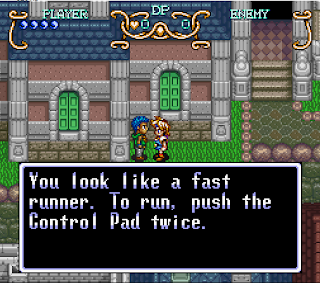
The original text box in the game:

The edited text box in the event editor:

The edited text box in the game:

I changed the text as well as the text profile to Erik's profile.


Samstag, 22. Mai 2021

Event Editor: Add and delete commands

 990 / 5000

Übersetzungsergebnisse

After a long time there is an update here again. In the last few months I've been working on the event editor more or less regularly. The event editor has proven to be the toughest chunk so far, as it is not easy to read out the structure and the context of the commands, to display them and ultimately to write them back correctly to the ROM. But I proceed step by step here, reading and displaying the command structures works so far. Now I have also implemented the addition, deletion and editing of commands in the editor. On the following two screenshots you can see a text box that I added and the same command a few times. In the last screenshot I deleted the entire branch.


Now, the hardest part follows, the correct writing of the events in the ROM. First I have to rebuild the code a bit, because I want to use a design pattern that will hopefully make the task easier.

Mittwoch, 23. Dezember 2020

Event Editor: Item & World Map Events

Today I will show you some more features of the event editor. In the event scripts more event scripts are called. These are now also displayed in the editor:

Furthermore, I have now married the events of the items and the world map with the event editor. You can now jump from the pages directly to the event script in the event editor:


Samstag, 12. Dezember 2020

Event Editor: Read all events

Hello to all. I have a small interim report today regarding the event editor. For the first time I managed to read all (so far known) event scripts without crashing the program :)

Besides the scripts that are called by NPCs on the maps, there are also scripts that are called within these event scripts. These are now also listed in the list, it currently contains 848 scripts.

The following screenshot shows the current list in the event editor:


Sonntag, 1. November 2020

Event Editor: Switch condition commands

The Event Editor is progressing. I have now implemented support for a new command type. It is a switch condition, a selection of several conditions.
This is another step towards event editing, because I have to be able to read the events cleanly before I can write them back into the ROM.
As an example I show you the event of Seth in the cave at South Cape. This event first creates the statue that Will has to move with the help of his flute. For this the position of the player is queried, in the form of the described switch condition commands:


Sonntag, 11. Oktober 2020

GaiaTheCreator v0.6.0

After I couldn't work on the editor for several weeks for private reasons, I can finally present you the current version of the editor:


The event editor is now executable with a variety of supported commands. I will try to complete the missing event commands. Furthermore I will work on making the events configurable and write them into the ROM in the near future.

Sonntag, 28. Juni 2020

Event Editor: Message Box Properties

Hello everybody, sorry for the long time without news. In the last months I have developed the event editor further. For example it is now possible to see the properties of a message box.
I'm planning a new release of the editor in the next few weeks, with which you can try out the event editor, at least as far as the display of events is concerned.
After that I will start editing these events. This is the last big missing feature of the editor. Then it is at least possible to adjust the most important things in the game. Of course I will have to put some effort into the correct composition of the edited data in the ROM, but everything at its time :)

So this screenshot shows the displayed message box properties in the event editor:


Samstag, 21. März 2020

Event Editor: Message Box Choices

I continue to make good progress with the Event Editor. I have added many more commands (again a big thanks to Raeven0 for decrypting the commands). Today I would like to present you the command for Message Box Choices whose implementation was not so easy because the number of choices is dynamic.
But nevertheless here you can see the current implementation:


I plan to release a new release of the editor when I have implemented some more commands. Then you may play around with it yourself.

Montag, 10. Februar 2020

Events Part 2

The last weeks I have completely revised the Event Editor. The event commands are now simply defined in an XML file and read in by the editor. This makes it very easy to add new commands. And thanks to Raeven0 all commands are already known and can be added bit by bit.
The screenshots show an event in South Cape (the woman complaining when Will jumps from the roof of the house) and a part of the described XML file.


Samstag, 18. Januar 2020

Events Part 1

Hey everyone and happy new year :)

I'm still working on the editor though I couldn't find much time for it the last months.
Currently I'm working on events since they are the last major part of the editor which is not working properly yet.

You can now change the script ID and several other propeties of an event. As an example I exchanged the script of Seth's father in South Cape with the script of the bat from the Underground Tunnel.
I also set the enemy's state to that of the boss Castoth.

And here is the result in the game:


Sonntag, 27. Oktober 2019

GaiaTheCreator v0.5.8

This is only a small update, I released a new version with some minor fixes and features:
- Fixed several bugs related to the display of events
- Display all occurences for an event in the event editor

Here you can get the latest version:
GaiaTheCreator 0.5.8

Montag, 7. Oktober 2019

Map Rearrangement Data + GaiaTheCreator v0.5.7

It's now possible to edit the map rearrangement script data in the editor!
Map rearrangement means e.g. doors which are opened after enemies are defeated or using Will's special abilities.
Again I have to thank Raeven0 for finding the data set :)

Here is an example:

I wanted to edit the map rearrangement script in the cave in Itory when Will uses his new Dash ability on the rocks. As a new feature it is possible to directly switch to the event editor for the selected event by klicking the "Edit Event" button:

Here we see the event script in the event editor. Now we know that the map rearrangement script has the ID 26.


In the new tab "Map Rearrangement Data" we can edit the data. I changed the data in a way that one of the statues is placed on the rocks instead of the door when Will uses his Dash power.

The result in the game:

You can try this for yourself in the latest version of the editor:
https://www.dropbox.com/s/vdupah7m12rj7i5/GaiaTheCreator%280.5.7%29.zip?dl=0

Sonntag, 29. September 2019

GaiaThe Creator 0.5.6

As promised I uploaded the latest version of the editor with these new features:

- Edit enemy states
- Edit screen settings
- New event editor (not fully working and incomplete).

Have fun :)

https://www.dropbox.com/s/k1wu3nvtfsh7y2m/GaiaTheCreator%280.5.6%29.zip?dl=0

Dienstag, 10. September 2019

Screen Settings

The screen settings are now fully editable in the editor.
I moved the settings from the map editor to a separate tab since they are so numerous.
A screen setting consists of 10 Bytes, each bytes is a bitfield containing the configuration bits.
So you can choose the setting category (= a specific byte) and set or clear each bit.

The meaning of these configuration was nearly completely decoded by Raeven0, so once again a big thank you :)

-> As an example, I disabled the sprites for screen setting #3 (used by South Cape and several other maps)

-> The sprites in South Cape have disappeared!

I will upload a new version of the editor once I'm fully finished with this feature.

Sonntag, 19. Mai 2019

Enemy States

Again, thanks to the efforts of DontBaguMe and Raeven0, it's now possible to edit the enemy states in the editor! So thank you both ;)
The enemy states are stored in a single data set. This data set contains the status information for all enemies which is comprised by four bytes:
HP - Health Points
STR - Strength
DEF - Defense
DP - Dark Points

First you can check in the map event editor which enemy state ID belongs to the enemy:

As a next step, search the enemy state ID in the enemies tab and change the values:

Here is the result: A very strong bat!

Sonntag, 5. Mai 2019

Stairs Velocity

It's been a while since the last update so I think it's time to show something here, even if it's not a big update so you see I'm still working on the ditor ;)

Thanks to DontBaguMe and Reaven0 I was able to add the stairs camera velocity information to the editor.

There is a data table at 1A95E which holds several camera movement patterns.

Here is the explanation of this data from Raeven0, I couldn't explain it better for myself:

These are stair-climbing camera movement speeds. A staircase in map data has a byte whose high nibble defines whether it's a down-going ($4x) or up-going ($8x) staircase, and the low nibble points to one of these speed sets. Each 2-byte word is a "step" in the camera movement, first byte is the number of frames for this "step" to last, second byte is its speed (but the high nibble of the speed byte is ignored, so the range is only 0-F). Will can't do anything until the camera movement finishes -- he's stuck inside the staircase. Once the camera finishes moving, Will exits the staircase and regains control, and the camera centers on Will if it isn't already. There are no internal corrections or consistency checks to make sure that when the camera stops, it's centered on Will. You just have to choose the right stair velocity to make the camera traverse the correct vertical distance.

And now I added this information to the editor (and renamed steps to stairs which is much more fitting):


Freitag, 8. Februar 2019

Room-Clearing Rewards + GaiaTheCreator 0.5.5

After I ignored the data sets for quite a long time, I investigated the room-clearing reward table and was able to add it to the editor. As an explanation, the room-clearing award is the status updgrade which is received when you beat all enemies in a single room.

The table contains a reward value for every map.
These are the possible rewards:

Value
Description
0
No reward
1
HP (Power)
2
STR (Strength)
>= 3
DEF (Defense)


You can try the treasure chest and room-clearing rewards editing in the latest release 0.5.5:
https://www.dropbox.com/s/gp100nw4jytwe7o/GaiaTheCreator%280.5.5%29.zip?dl=0